
Your users ask. Your system answers with safe SQL.
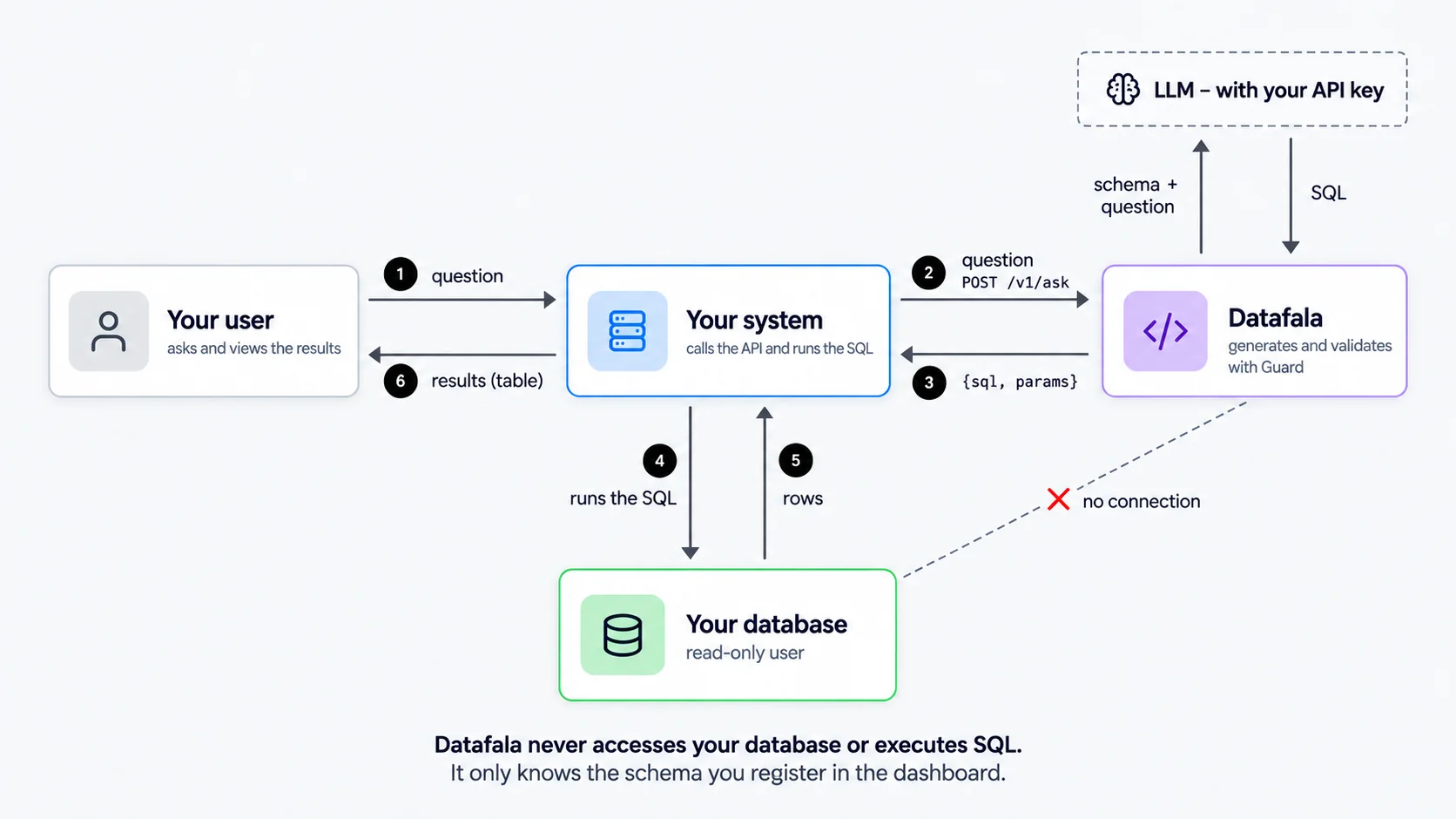
Datafala receives the question in natural language, generates a validated SELECT for PostgreSQL, MySQL or Firebird 2.5+, and returns the SQL with its parameters. It never connects to your database: your system runs it, with a read-only user.
how much did I sell of product X in the last 6 months?
{
  "sql": "SELECT SUM(vi.quantidade * vi.valor_unitario) AS total_vendido FROM venda_itens vi JOIN vendas v ON v.id = vi.venda_id JOIN produtos p ON p.id = vi.produto_id WHERE p.nome ILIKE %(product)s AND v.status <> 'C' AND v.data >= CURRENT_DATE - INTERVAL '6 months'",
  "params": { "product": "%product x%" },
  "dialect": "postgres",
  "tables": ["venda_itens", "vendas", "produtos"],
  "explanation": "Sums quantity × value of the items of product X in non-cancelled sales from the last 6 months."
}- PostgreSQL
- MySQL
- Firebird 2.5+
- Your own LLM key
- No access to your database
Three steps to your first answer
Describe your database
Paste the DDL into the panel, describe tables and columns, and hide whatever the AI must not use.
Teach it your business
Write rules and domain terms (“a cancelled sale has status C”) and add questions with the approved SQL as examples.
Integrate with one call
Your system sends POST /v1/ask with the question, receives {sql, params} and runs it on its own database.
Built to not trust the generated SQL
Every SQL goes through the Guard before it reaches your system.
SELECT only
Writes, DDL and multiple statements are rejected.
Allowlist
Only existing, visible tables and columns make it into the query.
Functions per dialect
Only the functions allowed for PostgreSQL, MySQL or Firebird 2.5+.
Guaranteed LIMIT
The row limit is rewritten in the query.
Named parameters
User text is never concatenated into the SQL.
Protected keys
The LLM key is stored encrypted and API keys are kept only as a hash.
If the SQL fails the Guard, the AI receives the reason and tries once more. If it still fails, your API gets a clear error, never an unsafe SQL.
A panel to configure, test and monitor
Playground
Test questions and see the SQL, the parameters, the tokens used and the response time.
History with feedback
See real questions, the 👍/👎 rating your system sends, and promote good answers to examples with one click. “View prompt” shows exactly what was sent to the AI.
Evaluation
Add questions with the expected SQL and run the suite before changing model or context. Result: equal, same objects (review) or different.
Schema versions
A new DDL creates a version and preserves descriptions and hidden items.
Credentials
Create and revoke API keys for each integration.
History via the API
Your system can reuse previous answers without another AI call.
curl -X POST https://app.datafala.com.br/v1/ask \
  -H "Authorization: Bearer $DATAFALA_API_KEY" \
  -H "Content-Type: application/json" \
-d '{"question": "how much did I sell of product X in the last 6 months", "end_user": "usr_8f3a91c2d4e7b605", "max_rows": 100}'import httpx, psycopg
resposta = httpx.post(
"https://app.datafala.com.br/v1/ask",
headers={"Authorization": f"Bearer {API_KEY}"},
json={
"question": "customers who bought the most this month",
"end_user": ID_DO_USUARIO, # opaque id of your user (16 to 128 characters)
},
).json()
with psycopg.connect(
DATABASE_URL_SOMENTE_LEITURA,
options="-c statement_timeout=5000 -c default_transaction_read_only=on",
) as conn:
linhas = conn.execute(resposta["sql"], resposta["params"]).fetchall()import httpx
from django.db import connections
def perguntar(pergunta, id_do_usuario):
resposta = httpx.post(
"https://app.datafala.com.br/v1/ask",
headers={"Authorization": f"Bearer {API_KEY}"},
json={"question": pergunta, "end_user": id_do_usuario},
).json()
# "leitura" is a database configured with a read-only user
with connections["leitura"].cursor() as cursor:
cursor.execute(resposta["sql"], resposta["params"])
return cursor.fetchall()import httpx, psycopg
from fastapi import FastAPI
app = FastAPI()
@app.get("/perguntar")
async def perguntar(pergunta: str, id_do_usuario: str):
async with httpx.AsyncClient() as client:
r = await client.post(
"https://app.datafala.com.br/v1/ask",
headers={"Authorization": f"Bearer {API_KEY}"},
json={"question": pergunta, "end_user": id_do_usuario},
)
resposta = r.json()
# connection with a read-only user
async with await psycopg.AsyncConnection.connect(DATABASE_URL_SOMENTE_LEITURA) as conn:
cur = await conn.execute(resposta["sql"], resposta["params"])
return await cur.fetchall()import { Client } from "pg";
interface Resposta {
sql: string;
params: Record<string, unknown>;
}
const r = await fetch("https://app.datafala.com.br/v1/ask", {
method: "POST",
headers: {
Authorization: "Bearer " + process.env.DATAFALA_API_KEY,
"Content-Type": "application/json",
},
body: JSON.stringify({
question: "customers who bought the most this month",
end_user: idDoUsuario, // opaque id of your user (16 to 128 characters)
}),
});
const resposta = (await r.json()) as Resposta;
// pg uses $1, $2…: replace each %(name)s with the positional value and %% with %
const valores: unknown[] = [];
const sql = resposta.sql.replace(/%%|%\((\w+)\)s/g, (trecho, nome: string) => {
if (trecho === "%%") return "%"; // the literal %% goes back to a single %
valores.push(resposta.params[nome]);
return "$" + valores.length;
});
const db = new Client({ connectionString: process.env.DATABASE_URL_SOMENTE_LEITURA });
await db.connect();
const { rows } = await db.query(sql, valores);const { Client } = require("pg");
async function perguntar(pergunta, idDoUsuario) {
const r = await fetch("https://app.datafala.com.br/v1/ask", {
method: "POST",
headers: {
Authorization: "Bearer " + process.env.DATAFALA_API_KEY,
"Content-Type": "application/json",
},
body: JSON.stringify({ question: pergunta, end_user: idDoUsuario }),
});
const resposta = await r.json();
// pg uses $1, $2…: replace each %(name)s with the positional value and %% with %
const valores = [];
const sql = resposta.sql.replace(/%%|%\((\w+)\)s/g, (trecho, nome) => {
if (trecho === "%%") return "%"; // the literal %% goes back to a single %
valores.push(resposta.params[nome]);
return "$" + valores.length;
});
// connection with a read-only user
const db = new Client({ connectionString: process.env.DATABASE_URL_SOMENTE_LEITURA });
await db.connect();
const { rows } = await db.query(sql, valores);
await db.end();
return rows;
}using System.Net.Http.Json;
using System.Text.Json;
using System.Text.RegularExpressions;
using Npgsql;
var http = new HttpClient();
http.DefaultRequestHeaders.Add("Authorization", "Bearer " + apiKey);
var r = await http.PostAsJsonAsync(
"https://app.datafala.com.br/v1/ask",
new
{
question = "customers who bought the most this month",
end_user = idDoUsuario, // opaque id of your user (16 to 128 characters)
});
var resposta = await r.Content.ReadFromJsonAsync<JsonElement>();
// Npgsql uses @name: replace each %(name)s and undo the literal %%
var sql = Regex.Replace(resposta.GetProperty("sql").GetString()!, @"%%|%\((\w+)\)s",
m => m.Value == "%%" ? "%" : "@" + m.Groups[1].Value);
// connection with a read-only user
await using var conn = new NpgsqlConnection(connStringSomenteLeitura);
await conn.OpenAsync();
await using var cmd = new NpgsqlCommand(sql, conn);
foreach (var p in resposta.GetProperty("params").EnumerateObject())
{
object valor = p.Value.ValueKind switch
{
JsonValueKind.Number => p.Value.GetDecimal(),
JsonValueKind.String => p.Value.GetString()!,
JsonValueKind.Null => DBNull.Value,
_ => p.Value.ToString(),
};
cmd.Parameters.AddWithValue(p.Name, valor);
}
await using var leitor = await cmd.ExecuteReaderAsync();uses
System.SysUtils, System.Classes, System.JSON, System.Net.HttpClient,
System.RegularExpressions, FireDAC.Comp.Client;
function Perguntar(const Pergunta, IdDoUsuario: string): TFDQuery;
var
Http: THTTPClient;
Json: TJSONObject;
Corpo: TStringStream;
Retorno: IHTTPResponse;
Resposta: TJSONObject;
Par: TJSONPair;
Sql: string;
begin
Json := TJSONObject.Create;
Http := THTTPClient.Create;
try
Json.AddPair('question', Pergunta);
// opaque id of your user (16 to 128 characters)
Json.AddPair('end_user', IdDoUsuario);
Corpo := TStringStream.Create(Json.ToJSON, TEncoding.UTF8);
try
Http.ResponseTimeout := 60000;
Http.ContentType := 'application/json';
Http.CustomHeaders['Authorization'] := 'Bearer ' + ApiKey;
Retorno := Http.Post('https://app.datafala.com.br/v1/ask', Corpo);
finally
Corpo.Free;
end;
finally
Http.Free;
Json.Free;
end;
Resposta := TJSONObject.ParseJSONValue(Retorno.ContentAsString(TEncoding.UTF8)) as TJSONObject;
try
if Retorno.StatusCode <> 200 then
raise Exception.Create(Resposta.GetValue<string>('code'));
// FireDAC uses :name: replace each %(name)s and undo the literal %%
Sql := StringReplace(Resposta.GetValue<string>('sql'), '%%', #1, [rfReplaceAll]);
Sql := TRegEx.Replace(Sql, '%\((\w+)\)s', ':$1');
Sql := StringReplace(Sql, #1, '%', [rfReplaceAll]);
// FDConexaoLeitura uses a read-only user
Result := TFDQuery.Create(nil);
Result.Connection := FDConexaoLeitura;
Result.ResourceOptions.MacroCreate := False;
Result.ResourceOptions.MacroExpand := False;
Result.ResourceOptions.EscapeExpand := False;
Result.SQL.Text := Sql;
for Par in Resposta.GetValue<TJSONObject>('params') do
if Par.JsonValue is TJSONNumber then
Result.ParamByName(Par.JsonString.Value).AsFloat := TJSONNumber(Par.JsonValue).AsDouble
else
Result.ParamByName(Par.JsonString.Value).AsString := Par.JsonValue.Value;
Result.Open;
finally
Resposta.Free;
end;
end;One call. You run it.
The SQL arrives with the parameters separated. Your system runs it with the driver it already uses, as a read-only user and with a timeout.
-
Errors with stable codes (
sql_rejected,no_answer,rate_limited…) - Query explanation in the user’s language
-
POST /v1/feedbackto say whether the answer was right
Use the key from the provider you already have.
- OpenAI
- Anthropic
- Google Gemini
- DeepSeek
- Mistral
- Groq
- Cohere
- xAI
- OpenRouter
You pay for tokens directly to the provider. One question uses at most two calls.
Plans by number of users
Fixed monthly fee, unlimited questions, bring your own LLM key.
| Tier | Monthly fee | Highlight | Action |
|---|---|---|---|
| Up to 100 users | US$ 97/month | To start offering the feature | |
| 101 to 300 users | US$ 397/month | For growing products | |
| 301 to 700 users | US$ 697/month | For larger customer bases | |
| 701 to 1,500 users | US$ 1,197/month | For heavy day-to-day use | |
| Over 1,500 users | Contact us | Custom terms |
- PostgreSQL, MySQL and Firebird 2.5+
- Full panel (schema, context, examples, playground, history, evaluation)
- Up to 20 API keys
Token costs stay with your LLM provider, on your account. Users are the end users of your system who ask questions.
For those who already have the data and want to give answers
Management software and ERP
“which customers haven’t bought in 90 days?”
B2B SaaS with reports
“average ticket per salesperson this quarter”
Internal data teams
“late orders by carrier”
Frequently asked questions
Put natural language questions in your system
Tell us a bit about your product and the database you use. We reply by email.